01
Overview
01
Overview
UX/UI
Web Platform
Startup
Boosting User engagement
Databin is an IoT-based waste management system that tracks bin conditions and optimizes collection routes to improve efficiency and sustainability across web, mobile, and tablet platforms.
Timeline
Q3 - Q4 2024
Role
Product Designer
Project type
UI / UX Design
Skills
Discovery
Ideation
Product
User flows
Data Visualization
Team
Databin
Developer - Nadal Nakhleh
VP R&D and Co-founder - Eyal Ron
PM - Ravit Sela
Kido
Design - Eti Laifer Sharvit
Skills
Discovery
Ideation
Product
User flows
Data Visualization
Context
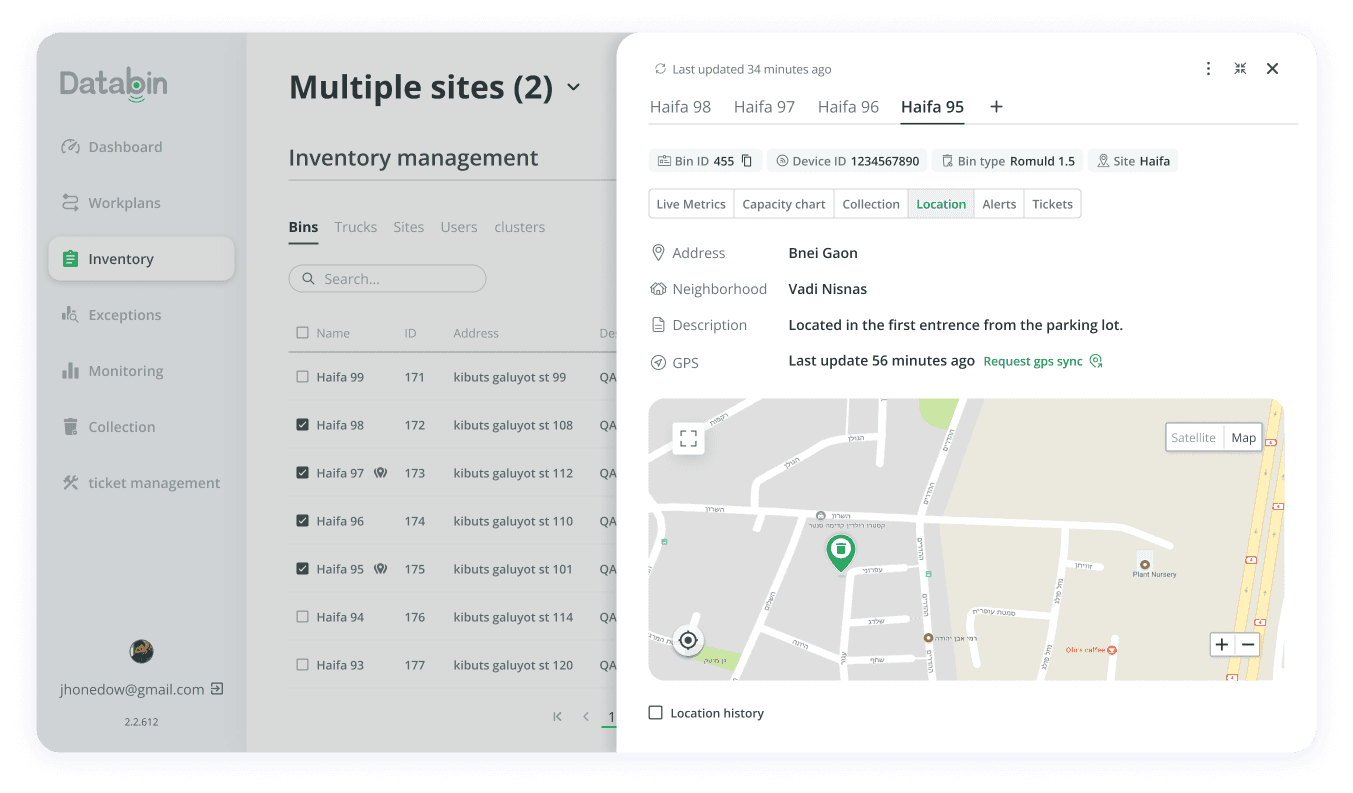
The project began as a request to add breadcrumbs, but during discovery Eti and I identified serious UX issues and aligned with stakeholders to redesign the entire end‑to‑end flow.
The project began as a request to add breadcrumbs, but during discovery Eti and I identified serious UX issues and aligned with stakeholders to redesign the entire end‑to‑end flow.
The project began as a request to add breadcrumbs, but during discovery Eti and I identified serious UX issues and aligned with stakeholders to redesign the entire end‑to‑end flow.
Problem
A major gap was that users could access bin data from multiple entry points across the platform including table and map layouts without a consistent experience.
Responsive everywhere
Responsive everywhere
Responsive everywhere
The solution needed to remain layout‑agnostic, ensuring consistency across different table and map layouts.
Clear live info
Clear live info
Clear live info
Enhance the clarity and arrangement of the live bin information already available.
Multi-bin compare
Multi-bin compare
Multi-bin compare
Users should be able to select multiple bins and be able to navigate and easily compare between them.
Brand refresh
Brand refresh
Brand refresh
Enhancing the brand visual style.
02
The Goals
Challenges
Solutions
Limited user research available
Partnered with the PM’s and the Co-founder's user‑proximate insights to define core pain points, prioritizing the lack of comparison as the primary problem to solve.
Framed lean hypotheses and validated flows with rapid internal reviews to keep momentum while minimizing research debt.
Tight project timeline with limited resources.
Operated on a ~30‑hours/month cadence, focusing on highest‑impact decisions and pausing non‑essential explorations.
Reused proven patterns (tabs and dropdown pagination) to accelerate delivery while preserving usability.
Users with low technology proficiency.
Chose a clear, low‑complexity UX: obvious entry points, plain labeling, and a single, guided path for multi‑bin comparison.
Reduced cognitive load with tidy hierarchy and generous spacing in the side panel, improving readability and scanability
Lack of a polished brand identity to reflect in the design.
Incrementally refreshed visuals during feature work: Add more colors tint , refined pins, and added UI components to the system.
Maintained a lightweight design system and ran regular VQA to ensure consistent implementation across platforms.
🧗🏻♂️ Challenge
Limited user research available
✅ Solution
Partnered with the PM’s and the Co-founder's user‑proximate insights to define core pain points, prioritizing the lack of comparison as the primary problem to solve.
Framed lean hypotheses and validated flows with rapid internal reviews to keep momentum while minimizing research debt.
🧗🏻♂️ Challenge
Tight project timeline with limited resources.
✅ Solution
Operated on a ~30‑hours/month cadence, focusing on highest‑impact decisions and pausing non‑essential explorations.
Reused proven patterns (tabs and dropdown pagination) to accelerate delivery while preserving usability.
🧗🏻♂️ Challenge
Users with low technology proficiency.
✅ Solution
Chose a clear, low‑complexity UX: obvious entry points, plain labeling, and a single, guided path for multi‑bin comparison.
Reduced cognitive load with tidy hierarchy and generous spacing in the side panel, improving readability and scanability
🧗🏻♂️ Challenge
Lack of a polished brand identity to reflect in the design.
✅ Solution
Incrementally refreshed visuals during feature work: Add more colors tint , refined pins, and added UI components to the system.
Maintained a lightweight design system and ran regular VQA to ensure consistent implementation across platforms.
03
Challenges & Solutions
We explored multiple directions and ended up with Two best options to focus on.
We explored multiple directions and ended up with Two best options to focus on.
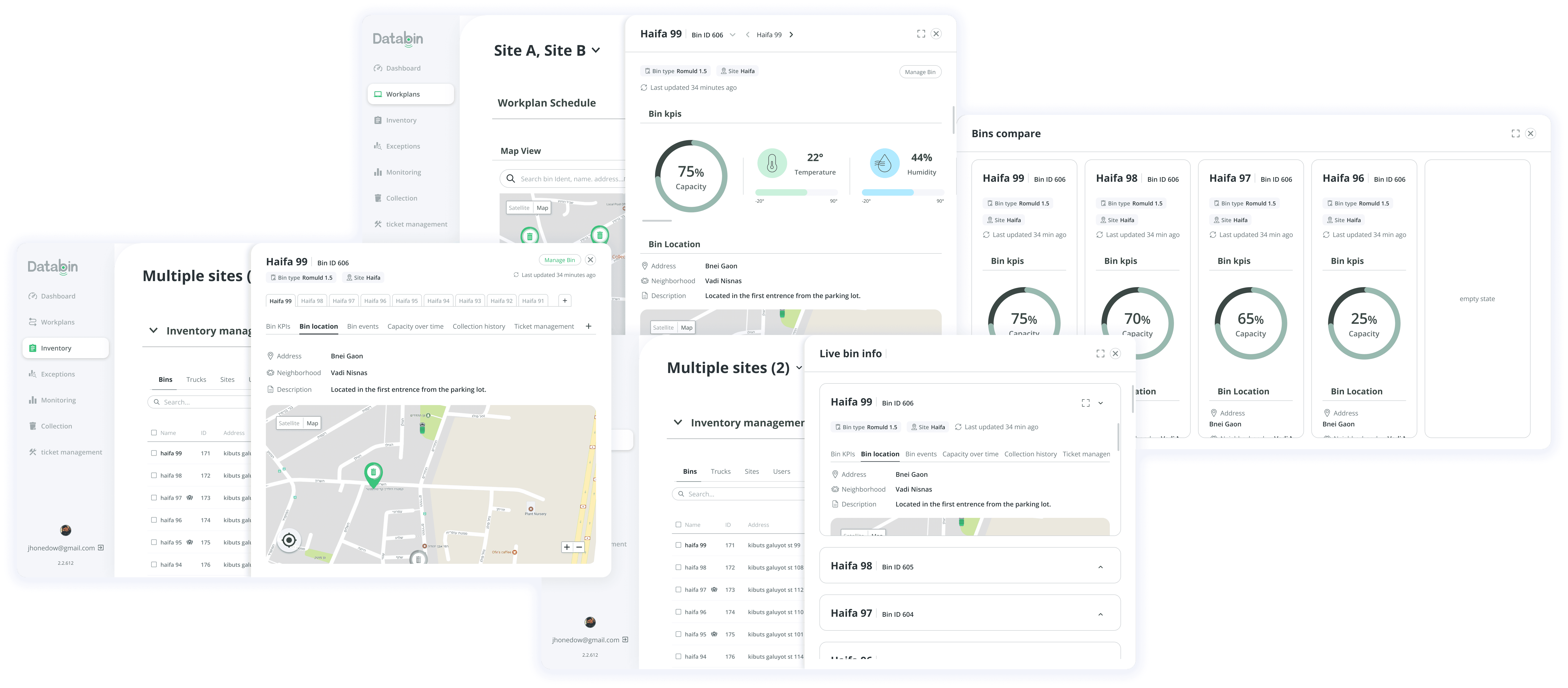
Given the constraints and user needs, we chose an overlay side panel to let users inspect and compare bins without losing sight of the table or map view.
04
Comparing patterns
Option 1
Dropdown List
When users click a bin name, the live bin data side panel opens.
The panel includes pagination‑based navigation, letting users add more bins from a dropdown and view them as a paginated list above the details panel.
Users can add bins relevant to their current context (for example, from the Inventory page), then apply their selection to navigate and compare metrics across multiple bins effortlessly.
When users click a bin name, the live bin data side panel opens.
The panel includes pagination‑based navigation, letting users add more bins from a dropdown and view them as a paginated list above the details panel.
Users can add bins relevant to their current context (for example, from the Inventory page), then apply their selection to navigate and compare metrics across multiple bins effortlessly.
When users click a bin name, the live bin data side panel opens.
The panel includes pagination‑based navigation, letting users add more bins from a dropdown and view them as a paginated list above the details panel.
Users can add bins relevant to their current context (for example, from the Inventory page), then apply their selection to navigate and compare metrics across multiple bins effortlessly.
The detailed bin data remains scrollable and is organized into well defined sections with generous white space to enhance readability and help users quickly locate vital information.
The detailed bin data remains scrollable and is organized into well defined sections with generous white space to enhance readability and help users quickly locate vital information.
Option 2
Tab based navigation
This version features tab-based navigation allowing users to switch between selected bins within the side panel.
Users can add more bins by clicking a plus button, which presents bins relevant to the current page, such as Inventory bins when on the Inventory page.
A second row of tabs lets users view live data for each bin like: metrics, location, and history keeping navigation clear and all information organized in one interface.
A second row of tabs lets users view live data for each bin like: metrics, location, and history keeping navigation clear and all information organized in one interface.
05
The outcome
Our final design retains tab-based navigation, refines the layout, removes duplicate labels for clarity, and applies tabs to data to help users stay focused and scan metrics quickly.
Our final design retains tab-based navigation, refines the layout, removes duplicate labels for clarity, and applies tabs to data to help users stay focused and scan metrics quickly.
Users can compare multiple bins in two ways:
Users can compare multiple bins in two ways:
1. Select bins directly in the table by checking their boxes to activate the Compare button
2. Open the side panel for one bin, then add more using the plus button; a table from the original view helps users easily select bins to compare.
1. Select bins directly in the table by checking their boxes to activate the Compare button
2. Open the side panel for one bin, then add more using the plus button; a table from the original view helps users easily select bins to compare.
The same comparison table listing bins from the user’s entry context is also available when users arrive from map layouts, ensuring a consistent flow across pages.
The same comparison table listing bins from the user’s entry context is also available when users arrive from map layouts, ensuring a consistent flow across pages.
06
Enhancing the brand
We also created new components that were later added to the design system,
and refreshed the existing design of the pins.
We also created new components that were later added to the design system,
and refreshed the existing design of the pins.
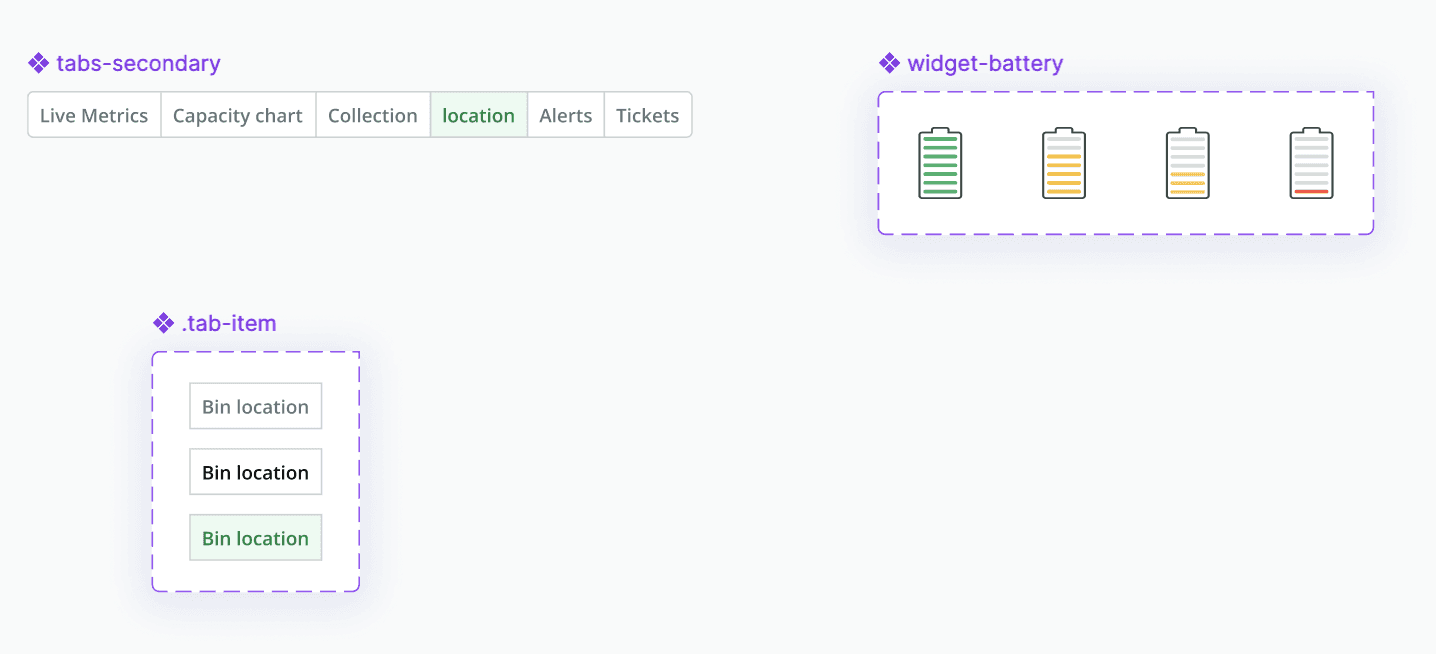
Battery status widget
Battery status widget
Battery status widget
Good
Good
Good
Normal
Normal
Normal
Low
Low
Low
Critical
Critical
Critical
Tabs secondary
Tabs secondary
Tabs secondary
States
States
States
Idle
Idle
Idle
Hover
Hover
Hover
Pressed
Pressed
Pressed
The bin icon was replaced by a number indicating the pick-up order for each bin.
The color scheme was unified, removing the previous mix of tones for a cleaner visual hierarchy.
Pins were reduced in size, as the larger version was unnecessary and outdated.
The bin icon was replaced by a number indicating the pick-up order for each bin.
The color scheme was unified, removing the previous mix of tones for a cleaner visual hierarchy.
Pins were reduced in size, as the larger version was unnecessary and outdated.
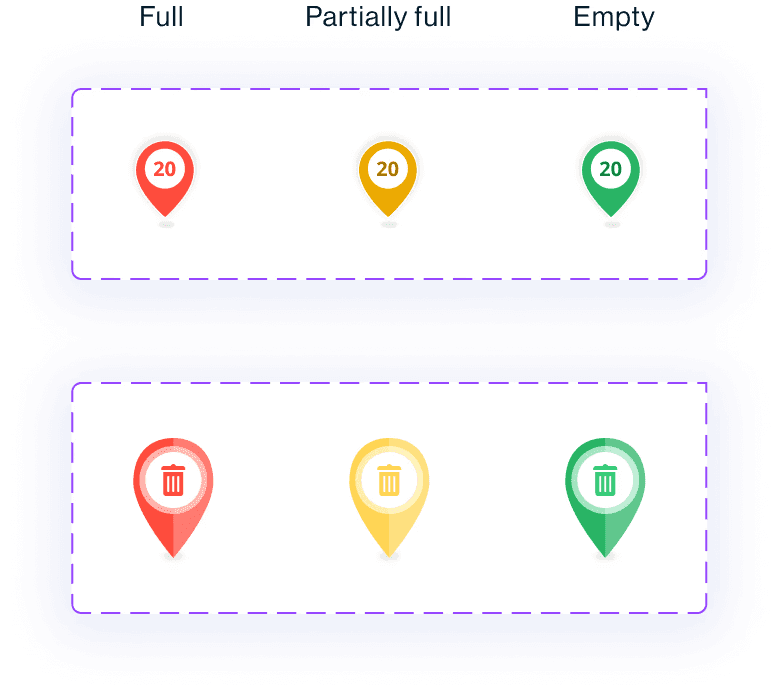
New
New
Old
Old
07
Results & Next steps
Adoption and engagement
Adoption and engagement
Adoption and engagement
Increase in users engaging with the live bin side panel across table and map pages after launch.
Increase in users engaging with the live bin side panel across table and map pages after launch.
↑ 30%
↑ 30%
Consistency across layouts
Consistency across layouts
Consistency across layouts
Nubmer of pages updated to the new pattern post‑launch.
Nubmer of pages updated to the new pattern post‑launch.
4#
4#
Following the initial launch of this feature, we plan to gather detailed insights into user behavior to better understand their needs and improve the experience.
Following the initial launch of this feature, we plan to gather detailed insights into user behavior to better understand their needs and improve the experience.
Key questions include:
Since launching the feature, have users been comparing multiple bins more frequently?
Is the current limit of comparing 8 bins meets requirements, or should it be increased or decreased?
Are there particular metrics or bin data users want prioritized for quick comparison?
Is there sufficient demand to justify developing a mobile-friendly version of this feature?
How important is real-time versus historical data for users in managing bins?
Do users want notifications or alerts integrated into the bin info feature?
Since launching the feature, have users been comparing multiple bins more frequently?
Is the current limit of comparing 8 bins meets requirements, or should it be increased or decreased?
Are there particular metrics or bin data users want prioritized for quick comparison?
Is there sufficient demand to justify developing a mobile-friendly version of this feature?
How important is real-time versus historical data for users in managing bins?
Do users want notifications or alerts integrated into the bin info feature?
Addressing these questions will guide the roadmap and ensure the solution continues to meet user expectations while supporting efficient decision‑making.
07
Next Project